显示标签为“XTOOL PS90”的博文。显示所有博文

2021-05-26

Tips to XTOOL PS90 Bluetooth Pairing

There is a Bluetooth module built into the VCI box to enable wireless connection to the PS90 tablet.
Indicators:
1. xtool VCI box  icon 01Power Indicator: Turns green to indicate the power is on.
2. xtool VCI box  icon 0 2Bluetooth Indicator: Turns red when Bluetooth is not connected, turns blue when Bluetooth is successfully connected.
3. xtool VCI box  icon 03Vehicle Indicator: Turns green when VCI box is connected with vehicle successfully.
4. xtool VCI box  icon 04USB Indicator: turns green when PS90 tablet and VCI box are connected via USB cable.
Bluetooth Connection :3->2->5->6
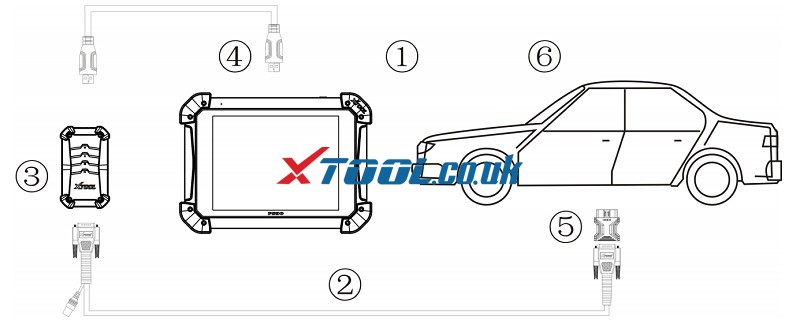
xtool-ps90-bluetooth-connection-precedure-01
a. Connect the main test cable to the VCI box, then connect the main test cable with the OBD2 16 Pin connector or other connector, then plug into vehicles DLC port .
b. Do not connect the PS90 Tablet to the VCI box with the USB cable. The Bluetooth will be paired automatically between PS90 tablet and VCI box.
c. Switch on the ignition and turn on PS90 tablet, then tap on PS90 application icon to test vehicles.
Bluetooth pairing:
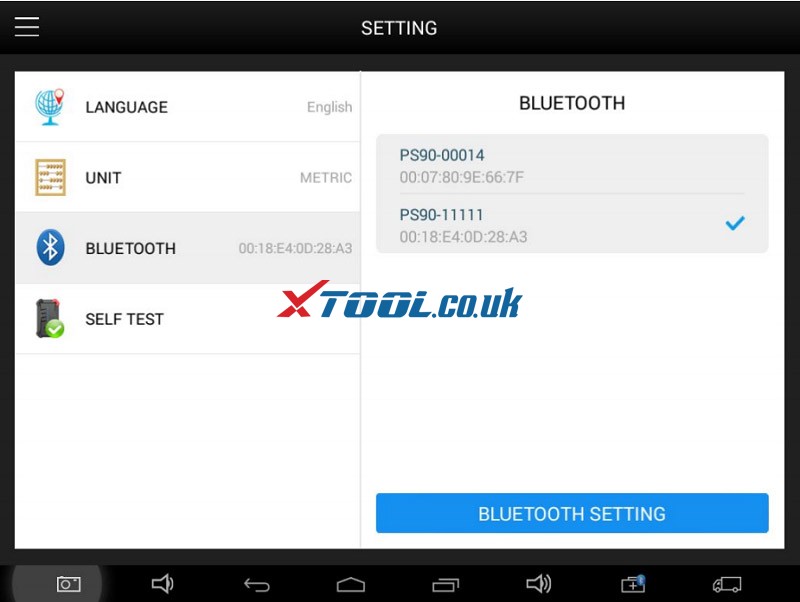
a. Select the VCI serial number and PS90 will pair with it automatically when running PS90 APP.
xtool-ps90-bluetooth-connection-precedure-02
How to pair with another device?
Unpair the current device first, and then pair with the device you want Click Setting, and
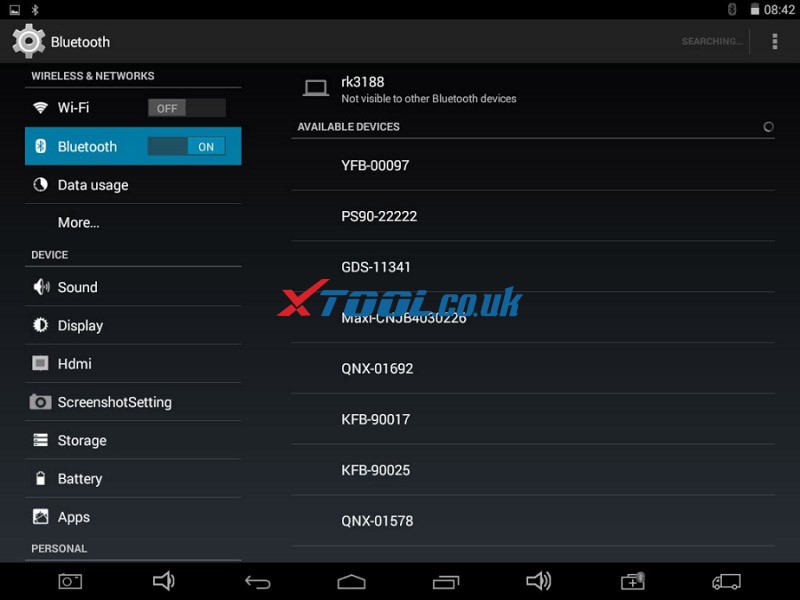
xtool-ps90-bluetooth-connection-precedure-03
Unpair the current device.
xtool-ps90-bluetooth-connection-precedure-04
Select the device you want to pair with PS90 and input the PIN code.
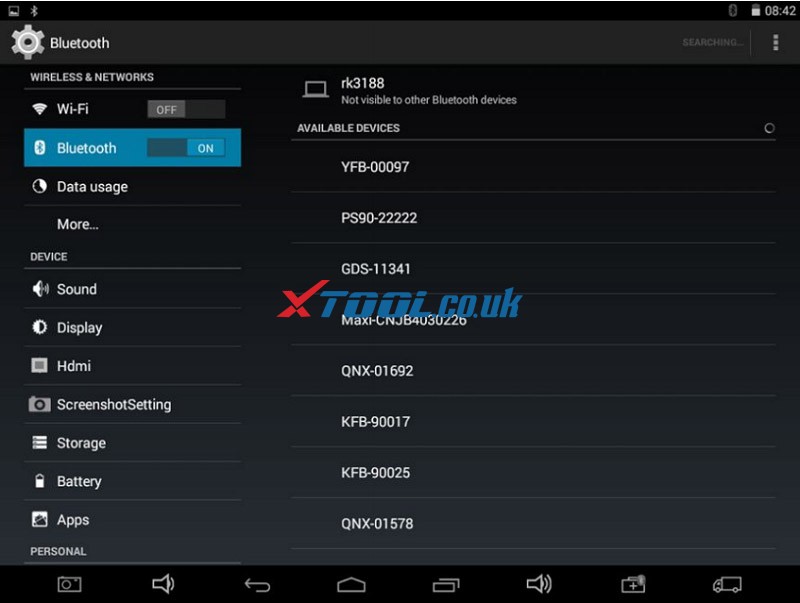
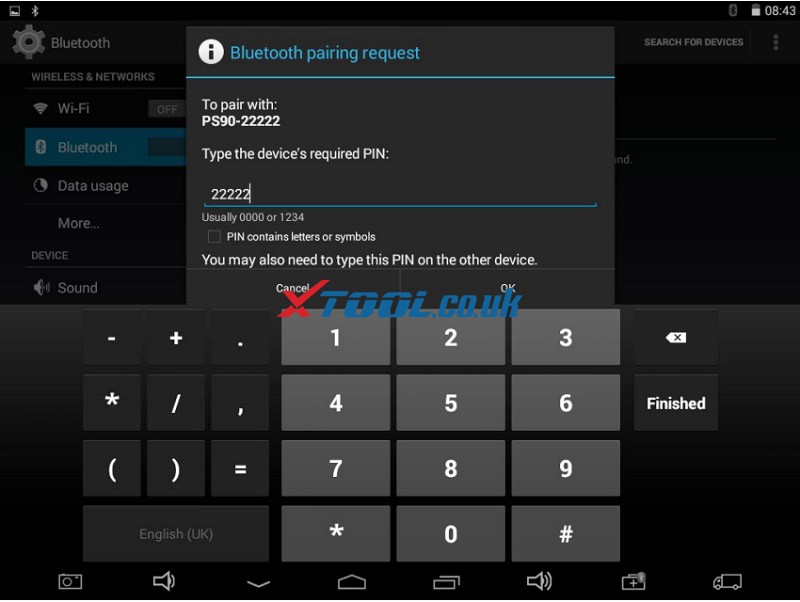
xtool-ps90-bluetooth-connection-precedure-05
xtool-ps90-bluetooth-connection-precedure-06

Question:
Q: I need assistance I pulled my tool today only to realise I couldn't connect to the car?it told me " Bluetooth Connection Failed "
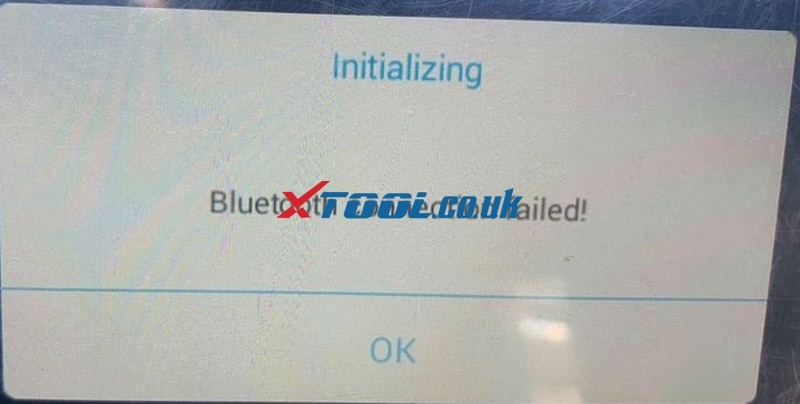
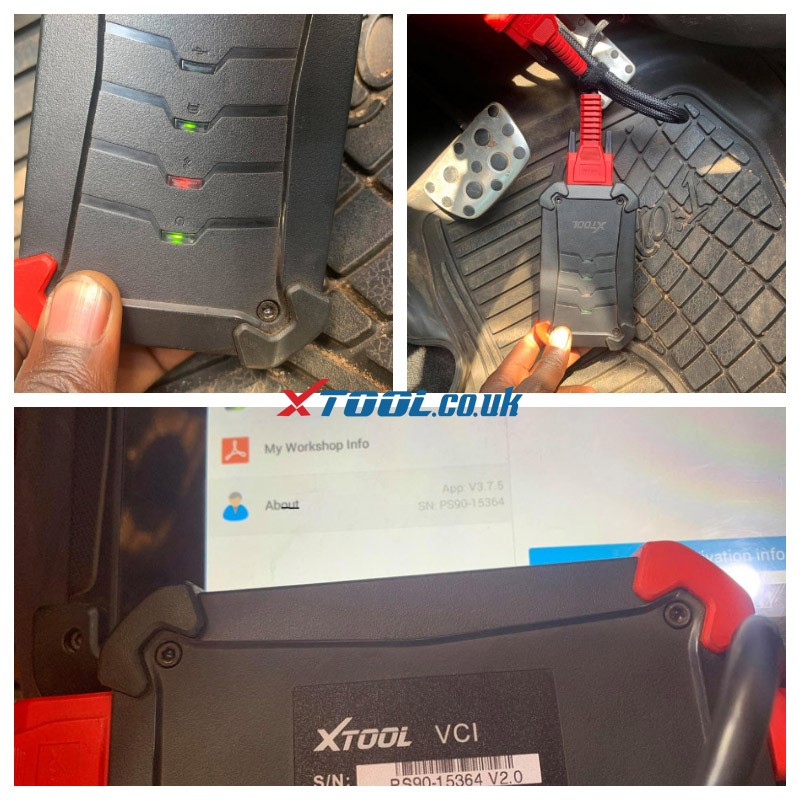
Solution-to-XTOOL-PS90-Bluetooth-Connection-Failed-01
Solution-to-XTOOL-PS90-Bluetooth-Connection-Failed-02
Answer from Xtool.co.uk engineer:

You should Go to app setting,then go blutooth ..in serch your divice pair, If you can find your blutooth pair, connection Directly, or if you can’t find the Bluetooth, Maybe your Bluetooth is broken.
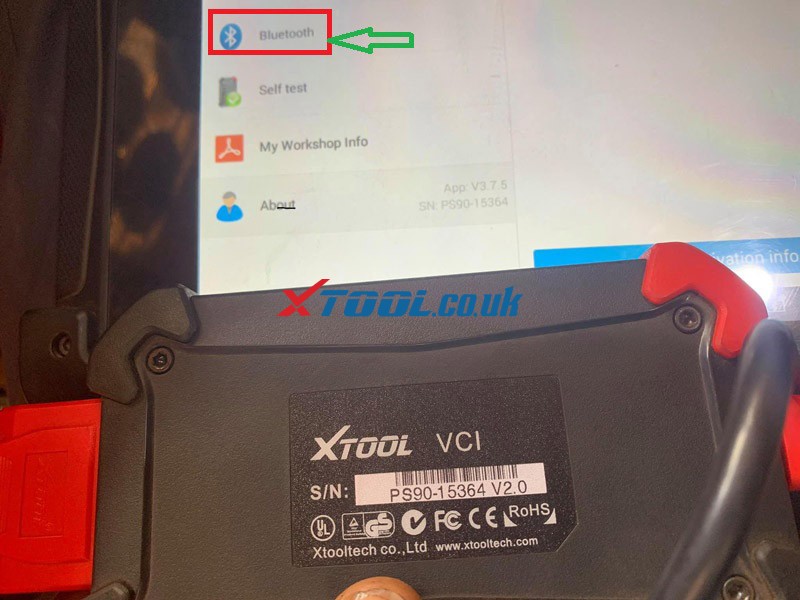
Solution-to-XTOOL-PS90-Bluetooth-Connection-Failed-03

Any further questions , please feel free to contact us:

Email: Sales@XTOOL.co.uk
whatsapp: +8618223445829

2021-04-25

Solved! XTOOL PS90 (Pro) Data Missing after Initialization

 Issue:XTOOL PS90 or PS90 Pro data missing/white screen after initialization 
Solution:Please install the newest XTOOL PS90 APK by the following free download link, then activate it and update the software.
𝙝𝙩𝙩𝙥𝙨://𝙭𝙩𝙤𝙤𝙡-𝙘𝙙𝙣𝙨𝙧𝙘.𝙤𝙨𝙨-𝙘𝙣-𝙨𝙝𝙚𝙣𝙯𝙝𝙚𝙣.𝙖𝙡𝙞𝙮𝙪𝙣𝙘𝙨.𝙘𝙤𝙢/𝙩𝙚𝙨𝙩/𝙥𝙨𝟵𝟬𝙝𝙙_𝙫𝟯.𝟳.𝟮_𝙘𝟭𝟱𝟮.𝙖𝙥𝙠

Step-by-step:
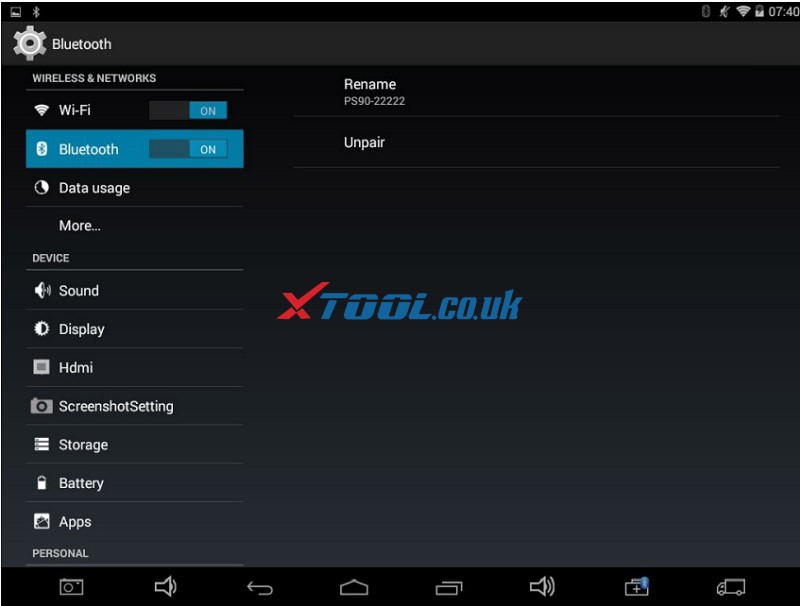
1.Go to settings and open WiFi to connect with an available router

2.Download and install the latest PS90 APK by searching the APP name or the apk link above
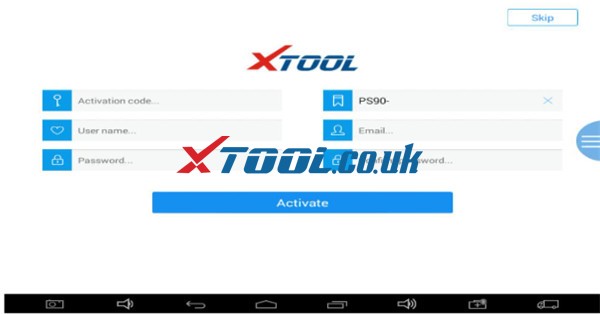
3.Open the PS90 application to activate with the activation code, serial number, user name, password, email…

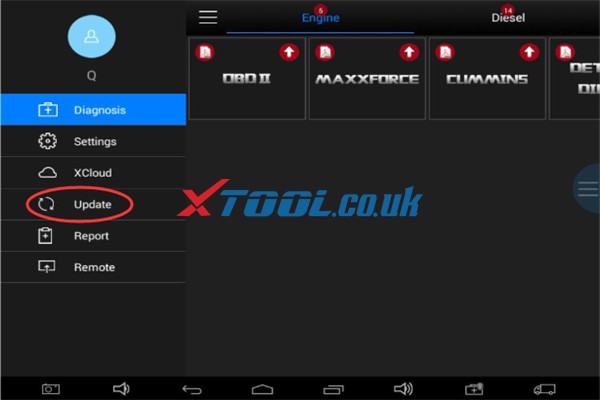
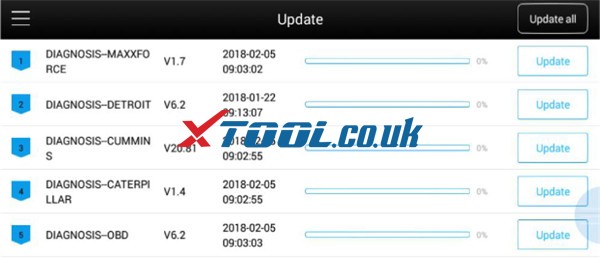
4.Go to the “Update” menu to update the car software you desire


Any further questions ,please feel free to contact us
Email: Sales@XTOOL.co.uk
whatsapp: +86 18223445829


More XTOOL PS90/PS90 Pro problems and solutions for reference:

How to release Xtool PS90 memory space

How to Fix XTOOL PS90 (Pro) Blank Screen Problem

How to Solve XTOOL Tablet Cannot Start After Update?

Successfully fixed! XTOOL PS90 Pro “Abnormal Icon display” Error


Tech support:

www.xtool.co.uk

2021-04-13

How to solve XTOOL PS90 (Pro) Blank Screen Problem

Here offer the solution to fix XTOOL PS90 or PS90 Pro appears blank (white) screen problem when connected to BMW car or other cars.

Customer problem:

Hi, I’m having problem connecting my xtool ps90 to any bmw cars. Every time we connect it freezing on a blank screen.

Xtool Ps90 Pro White Screen Solution 1


For this problem, xtool.co.uk engineer provides the corresponding solution as below.

There may be something wrong with the BMW or other car software, please uninstall (delete) the related software and download again.

Check the guide to delete car software:

http://blog.xtool.co.uk/how-to-release-xtool-ps90-memory-space/

Check the guide to download car software:

Step 1: Open the Settings icon on the XTOOL PS90 Pro or PS90

Step 2: Open WIFI and find the available router to connect

Xtool Ps90 Pro White Screen Solution 2

Step 3: Open PS90/ PS90 Pro application

Click “Update” to select the corresponding software to update again

Xtool Ps90 Pro White Screen Solution 3 Xtool Ps90 Pro White Screen Solution 4


Try to solve the problem using the method above! Come and share your test result with us!

Contact info:

Email: Sales@XTOOL.co.uk
whatsapp: +86 18223445829

Source: http://xtoolsupport.com/


2021-02-20

XTOOL PS90 And XTOOL X100 PAD,Any different?


Check the comparison table about XTOOL PS90 or XTOOL X100 PAD3 below:

Product nameXTOOL PS90XTOOL X100 PAD3
image 


XTOOL PS90 And XTOOL X100 PAD,Any different 01

 XTOOL PS90 And XTOOL X100 PAD,Any different 02
Full system diagnosisYes Yes, support common OBDII diagnosis
Read fault codeYesYes
Clear fault codeYesYes
Read data streamYesNo
Key programming (immobilization)YesYes
Odometer AdjustmentYesYes
Oil service resetYesYes
EPBYesYes
TPSYesYes
TPMS (Tire Pressure Warning Light Reset)YesYes
BMS ResetYesYes
HeadlightYesYes
Air SuspensionYesYes
SAS ResetYesYes
DPFYesYes
ABS BleedingYesYes
Airbag resetYesYes
Window initializationNoYes
Gearbox MatchNoYes
Crankshaft ResyncNoYes
Injector codeNoYes
CylinderNoYes
Seat configurationNoYes
Electronic Pump ActivationNoYes
Performance Tire UpgradeNoYes
Disable TransportationNoYes
Hardware comparison:
Operating SystemAndroid 4.4.4Android 5.1.1
CPURockchip 4 Core, 1.6GHzRockchip civil-grade processor
Storage space32GB FlashFLASH 64GB
RAM2G2G
Battery8000 mAh, 7.4V10000mAh
Resolution1024x768P1024*768
Screen size9.7-inch LED8 inch
HDMIYesYes
BluetoothYesNo
WIFIYesYes
Dimension300 (11.81”) x 220 (8.66”) x 50 (1.97”) mm275*183*33.9 (mm)
One key updateYesYes
LanguageEnglish, French, German, Italian, Polish, Portuguese, Spanish, RussianEnglish, French, German, Italian, Portuguese, Spanish, Russian, Polish, Japanese, Korean
DatabaseBuilt-in databaseBuilt-in database
Technical supportExpert service teamExpert service team
Price£730.00£907.00 (with KS-1 emulator)

The main difference between these two XTOOL tablets:

Though both XTOOL X100 PAD3 and PS90 support all system diagnosis, key programming, odometer adjustment and special function, the main function supported is different.

1.PS90 mainly supports all system diagnosis, can be used to read & clear fault code and read data stream, etc.

2.X100 PAD Elite mainly supports key programming and can do some common OBDII diagnosis, but it cannot read data stream.

Besides, X100 PAD3 features in more special functions such as Window initialization, Gearbox Match, Crankshaft Resync, Injector code, Cylinder, Seat configuration, Electronic Pump Activation, Performance Tire Upgrade and Disable Transportation.

XTOOL PS90 Package Including:

XTOOL PS90 And XTOOL X100 PAD,Any different 03
PS90 Tablet
VCI BOX
Tool Box(Carton Sticker)
Carton
MAZDA-17R
KIA-20
FOR BMW-20
HONDA-3
KIA HYUNDAI-10
OBD2-16
SELF TEST(OBD16)
TOYOTA-17
NISSAN-14
UNIVERSAL-3
FIAT-3
AUDI-4
SUZUKI-3
CITROEN-2
MITSUBISHI12+16
Main Cable (DB15 Double Male Cable with Power)
USB3.0 MAIN CABLE
DC5V-2.5A Power Adapter
Micro USB Charger Cable
Battery Clipper
Cigarette Lighter
Certificate of Quality
Packing List
User Manual


Xtool X100 PAD3 Package includes:

XTOOL PS90 And XTOOL X100 PAD,Any different 04

Main Units:
Mini B to USB 3.0 Type C Cable,X100 PAD3 Tablet,KC100,EEPROM 2 Adapter, Charger For tablet, Charger US Adapter, Charger EU Adapter

Test Connectors:
OBDII-16, HONDA-3,MAZADA-17,KIA20,HYUNDAI/KIA-10, DB15 Main Cable, USB3.0 Main Cable (1m)

Accessories:
Certificate of quality, Packing List, User Manual, Tool Case, Carton


Xtool PS90 car list:

http://www.xtooltech.com/EN/ProductView/PS90.html


Xtool X100 PAD3 car list:

http://www.xtooltech.com/EN/ProductView/X100PADElite.html


In short:

Which device is better for you depends on the budget, function, and car model you want to do.

*For key programming, choose XTOOL X100 PAD Elite key programmer.

*For full system diagnosis, choose XTOOL PS90 tablet full system diagnostic tool.


Related posts:

XTOOL PS90 VS XTOOL PS90 Pro

XTOOL X100 PAD3 VS OBDSTAR X300 DP Plus


2021-01-27

Xtool XPAD2 “Storage space is running out”, Any ideas?

 If your Xtool Scanner such as Xtool X100 PAD2 met these errors:
 "Storage space is running out”
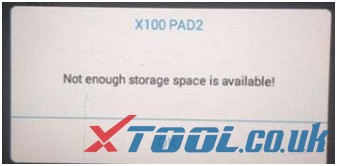
 "Not enough storage space is available !!"

It's normal, you should delete all infrequently used files or old software to free up space

The solution offered by xtool.co.uk engineer:
What you can do is that delete all infrequently used files or old software to free up space. Please operate step by step as below.
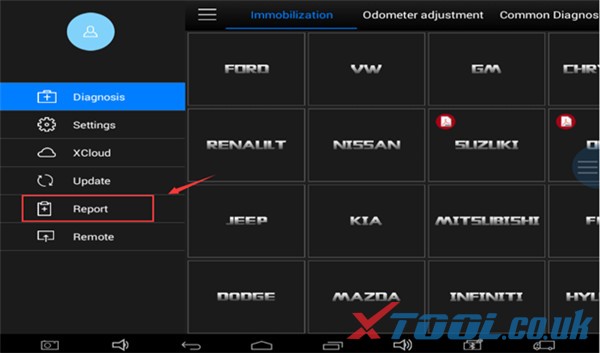
Step 1: Open the app and find the Report
How to solve Xtool “Storage space is running out 01
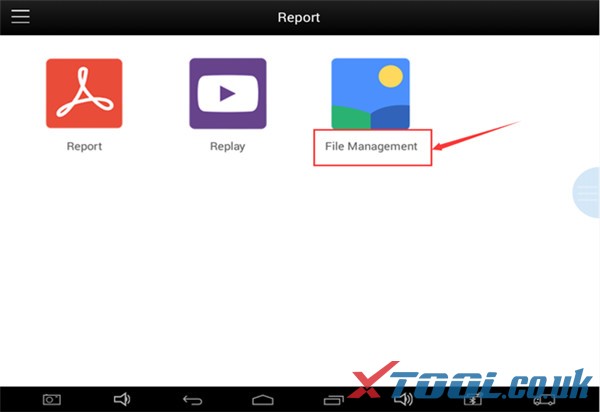
Step 2: Find the "File Management" menu
How to solve Xtool “Storage space is running out 02
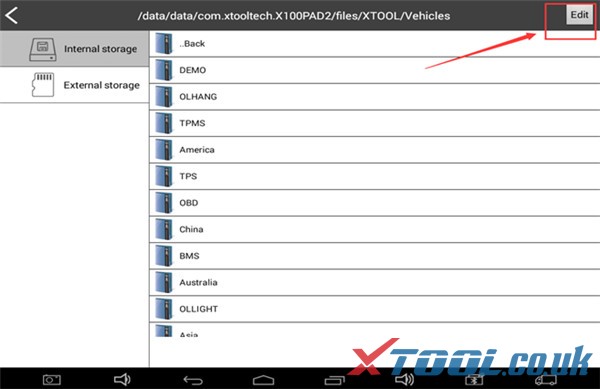
Step 3: Select the "Edit", click on the unneeded car
How to solve Xtool “Storage space is running out 03
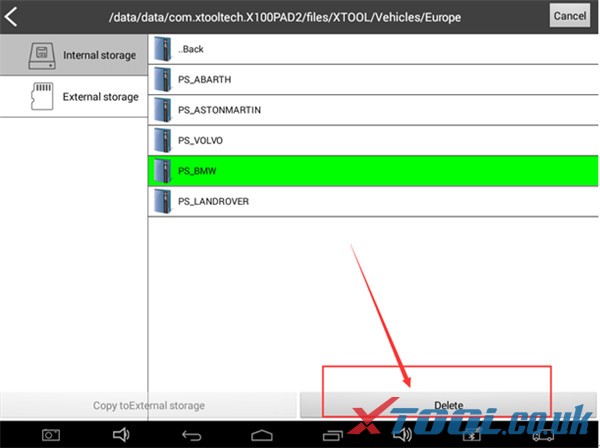
Step 4: Remove redundant models to retain storage space
How to solve Xtool “Storage space is running out 04
Please kindly notice:
This solution also applies to the XTOOL error “Not enough storage space is available!!!”
XTOOL error “Not enough storage space is available!!!

 Customer feedback:

Yes, there is no space to download all updates from all continents, we should only update to the continent we work on.


I reset everything and went back to updating, but it is very important that you have all the user's license data and that they are valid, if you have won the updates you will not be able to install anything else.

Source: https://www.xtool.co.uk/service/xtool-to-fix-xtool-storage-space-is-running-out.html


2021-01-12

How to use XTOOL PS90 Reset 2015 BMW X3 F25 Battery

 XTOOL PS90 Diagnostic tool is able to do EPB reset, BMS reset, TPS, injector coding, Service Light Reset, etc for BMW.
Today Xtool.co.uk will show you all how to reset the battery for BMW after replacement.

Purpose: Register Battery replacement
Car model: 2015 BMW X3 F25
Device: Xtool PS90
 

Operation video:


Main steps:
Step 1: Connect Xtool PS90 tablet with the BMW car
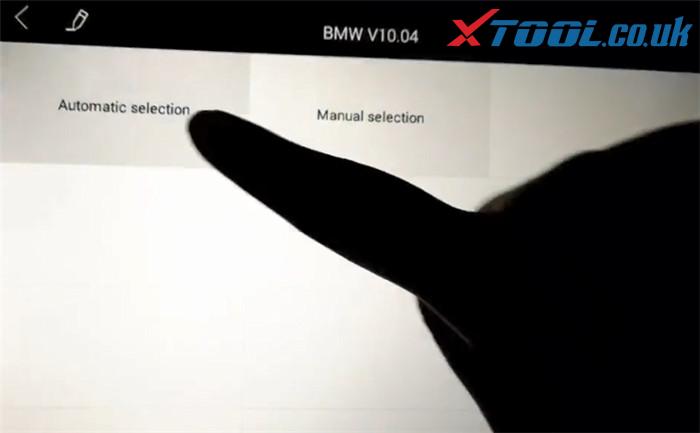
Step 2: Select “BMW”-> “Automatic selection”
Xtool Ps90 Bmw Battery Reset 1
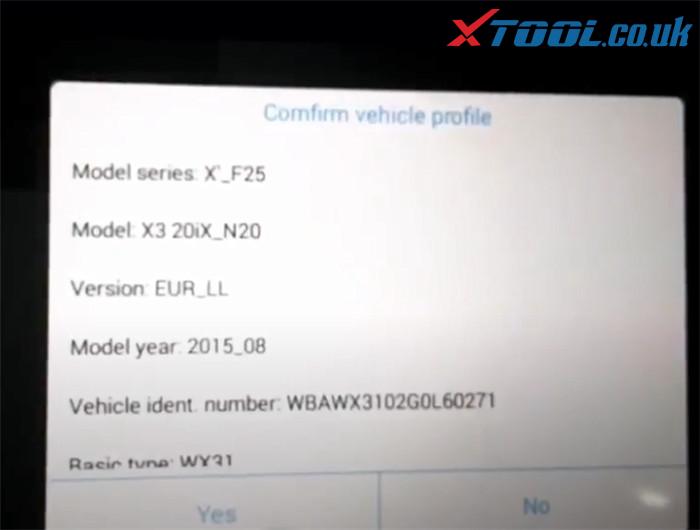
Confirm the vehicle profile detected incl. model series, model, version, model year, vehicle ident. number and basic type, etc.
Xtool Ps90 Bmw Battery Reset 2
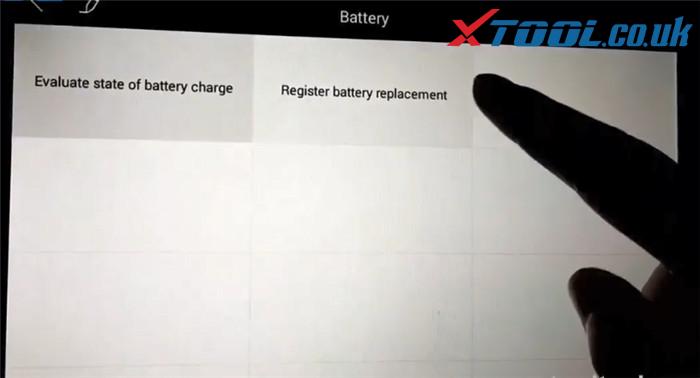
Step 3: Select “Service”->”Body”-> “Power supply (battery)”-> “Battery”-> “Register battery replacement”
Xtool Ps90 Bmw Battery Reset 3
1.Make original BMW battery replacement
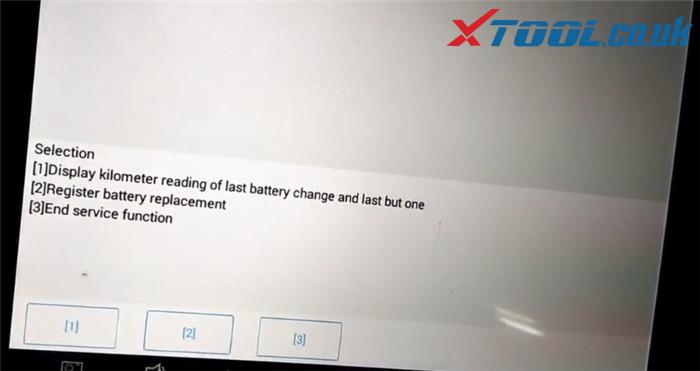
Then there will be three options to select
Press [1] to display kilometer reading of last battery change and last but one
Press [2] to register battery replacement
Press [3] to end service function
Here press [2] to next step
Xtool Ps90 Bmw Battery Reset 4
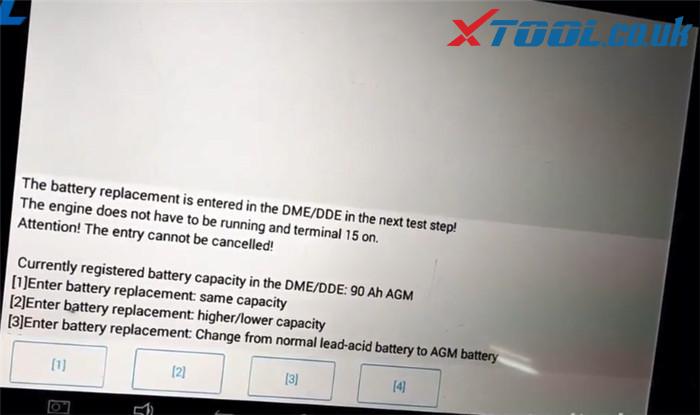
Now the battery replacement is entered in the DME/DDE in the next test step. There are also three options to select.
In this step press [F1] to enter battery replacement: same capacity
Xtool Ps90 Bmw Battery Reset 5
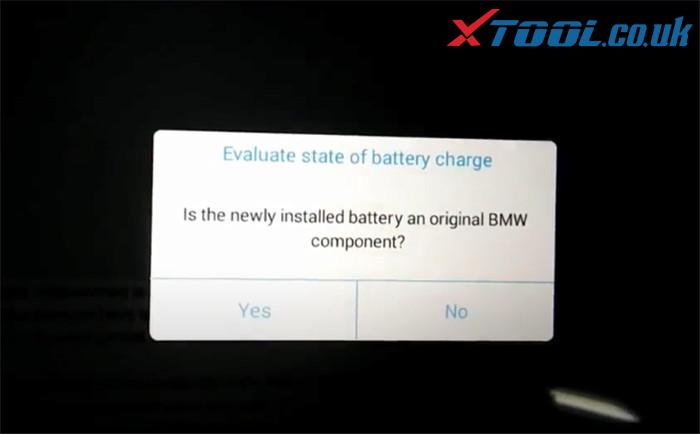
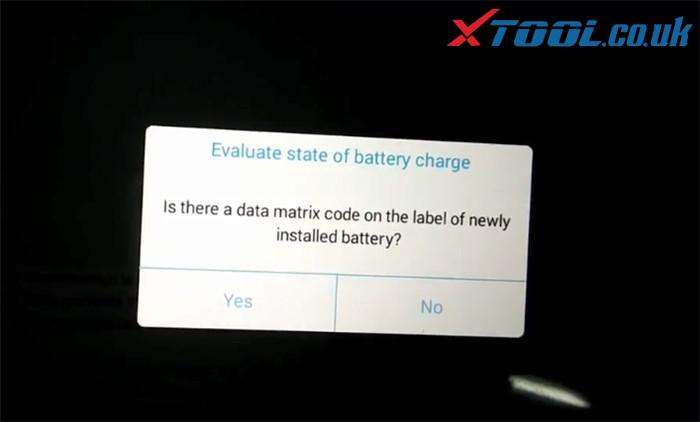
Press [Yes] to confirm the newly installed battery is original
Xtool Ps90 Bmw Battery Reset 6
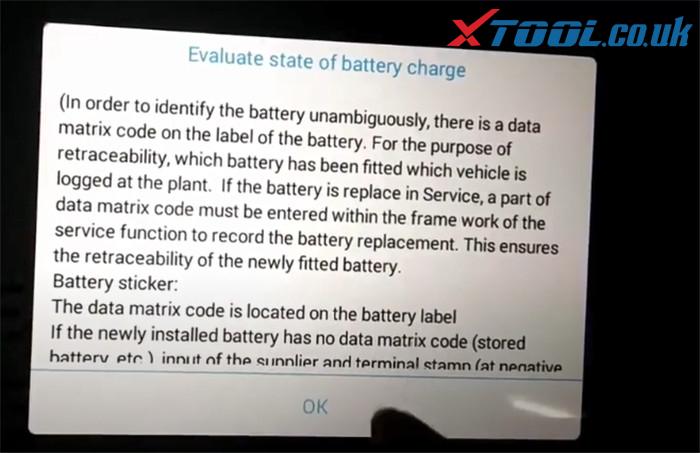
Pay attention to the instruction of Evaluate state of battery charge and press [OK]
Xtool Ps90 Bmw Battery Reset 7
Confirm if there is a data matrix code on the label of newly installed battery, and press [OK] to continue
Xtool Ps90 Bmw Battery Reset 8
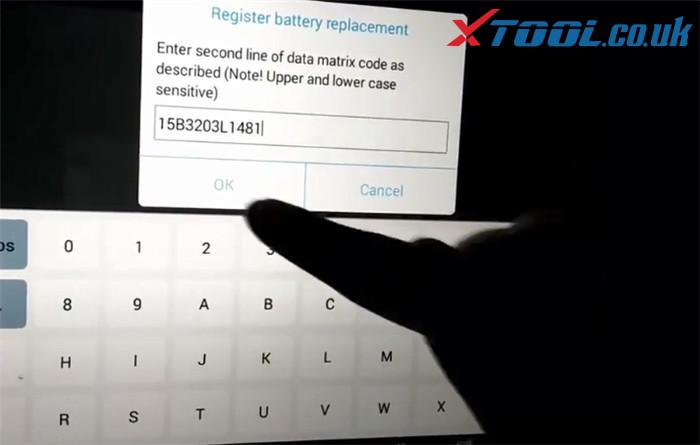
Enter second line of data matrix code as described and press [OK] to register battery replacement
Xtool Ps90 Bmw Battery Reset 9
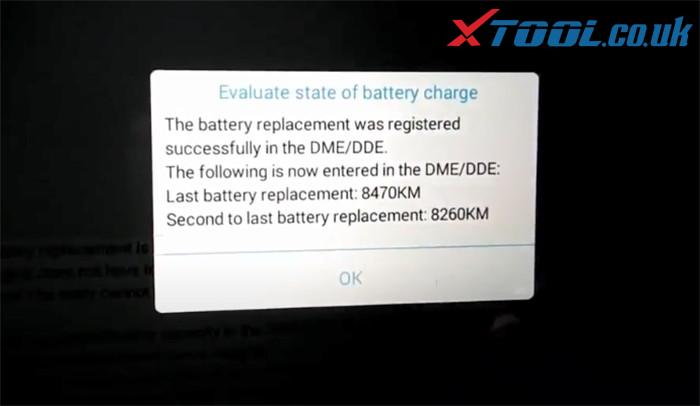
Register battery replacement successfully and it will show the related data
Xtool Ps90 Bmw Battery Reset 10
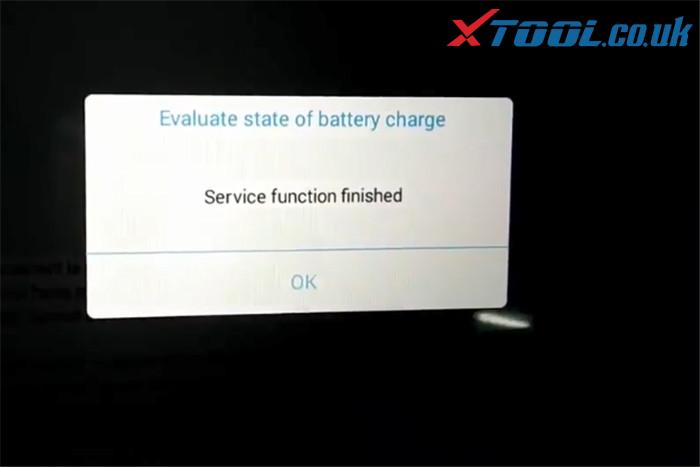
Service function is done!
Xtool Ps90 Bmw Battery Reset 11
2.Make non-original battery replacement
The first several steps are same as original battery replacement, the difference is to confirm whether the newly battery is original, you should press [No] to register battery replacement (no need to enter matrix code)
Finally, the battery replacement was registered successfully.
Job’s done!
 
If you want to know more specific BMW car models covered by XTOOL PS90 diagnostic tool in BMS reset, please feel free to contact us.
Email: Sales@XTOOL.co.uk
whatsapp: +8618223445829
How to program a Toyota G Chip Key using xtool D8

  Purpose:   program a G chip key for a Toyota Model:   Toyota Tacoma 2011 Tool option:   Xtool D8 Bi-Directional OBD2 Diagnostic Scanner He...